
CT/PET pairing and fusion
Verify CT and PET sources before viewing fusion.
1. Choose a pair
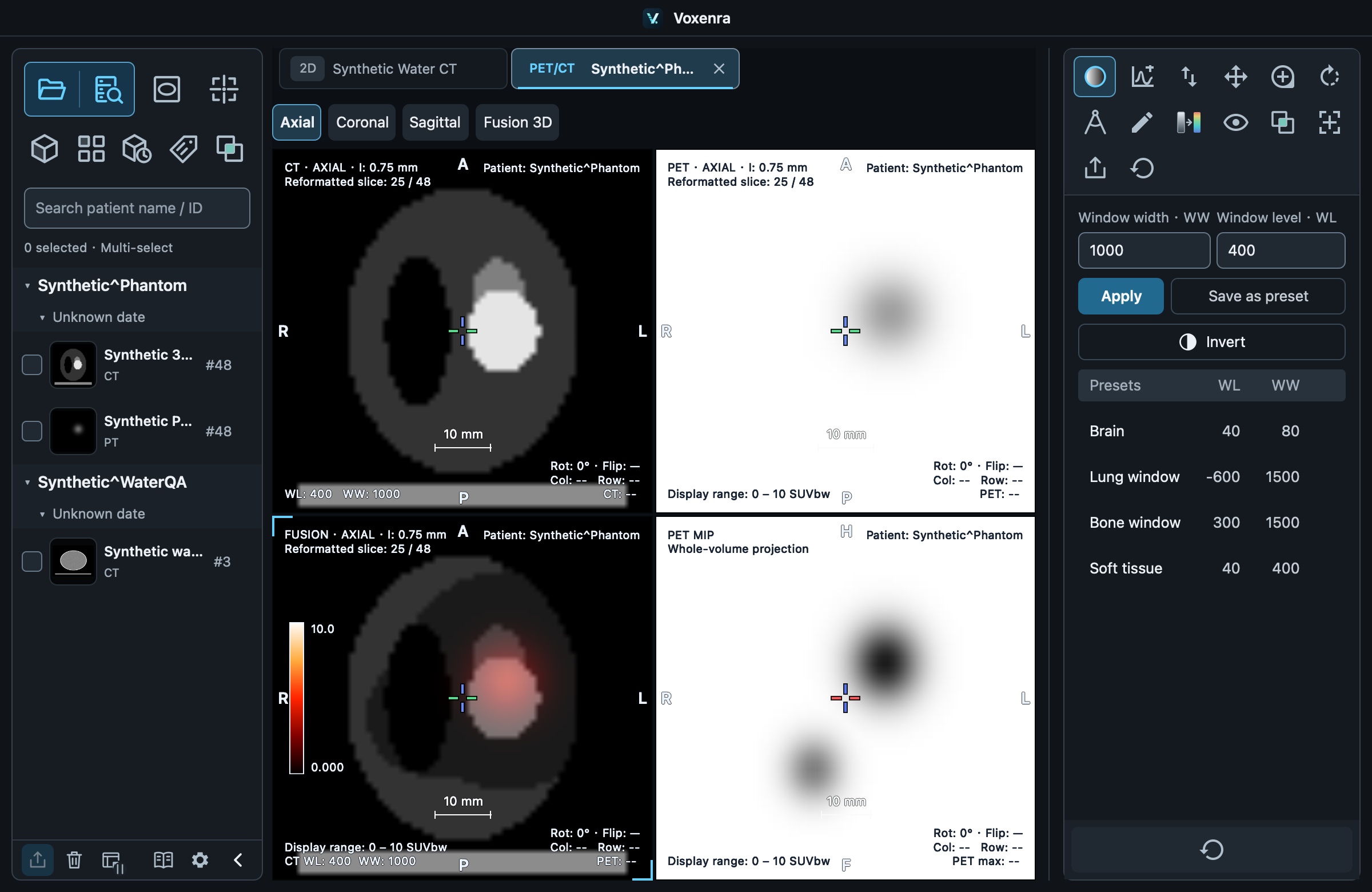
Select CT or PET, click Fusion, then choose the other modality; alternatively select one CT and one PET together. Candidates default to the same patient, prioritizing the same study.
2. Verify identity
Check patient, study and series. Enable Show other patients when necessary; mismatched or uncertain identity requires manual confirmation. Pairing does not guarantee registration. Check anatomical alignment.
3. Browse linked views
CT, PET and FUSION cells are linked; select axial / coronal / sagittal at the top. The fourth cell is PET MIP. Drag the locator cross to synchronize position. Use manual registration to adjust alignment.
Fusion 3D
Fusion 3D opens a separate tab for CT, PET or fusion. Switching tabs retains the viewpoint. Source registration updates 3D; closing the source keeps the last scene.